
Chat Anywhere with WhatsApp Web
Overview
WhatsApp Web is a desktop-based messaging tool that extends the functionality of the WhatsApp mobile app to web browsers. It allows users to access their WhatsApp conversations directly from a computer, offering a seamless experience for those who prefer typing on a larger keyboard or managing messages across multiple devices. The software functions as a bridge between a smartphone and a desktop browser, requiring the WhatsApp app to be installed and active on a compatible mobile device with an internet connection.
Designed for users seeking efficient communication without switching between devices, WhatsApp Web is ideal for professionals, students, and casual users who manage frequent messages. It enables real-time chat synchronization, ensuring that messages sent from the desktop appear instantly on the phone and vice versa. The software supports multiple platforms, including Windows and Mac, making it accessible to a broad user base.
While the developer, WhatsApp Inc., is not detailed beyond the company name, the product’s integration with mobile devices underscores its reliance on existing smartphone infrastructure. Real-world usage scenarios include remote work, online collaboration, and extended messaging sessions where a larger screen enhances productivity. The absence of standalone functionality highlights its role as a complementary tool rather than a replacement for the mobile app.
Key Features & Capabilities
- Mobile-Linked Messaging – WhatsApp Web mirrors the mobile app’s conversation history and message status in real time, enabling users to send and receive messages from a desktop browser.
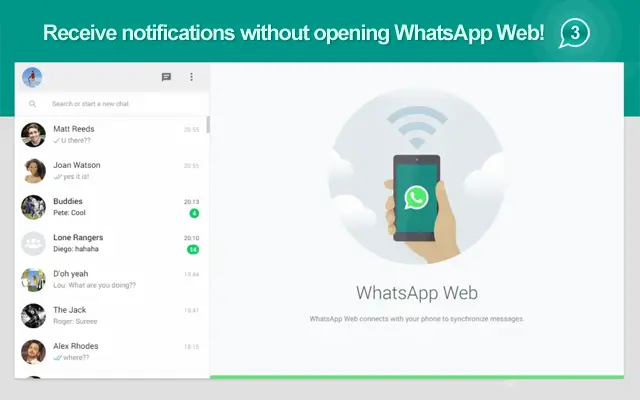
- Notification Sync – Users receive direct notifications on the WhatsApp icon in the browser, eliminating the need to open the web interface to check for new messages.
- Multi-Device Compatibility – Supports Android, Blackberry, Blackberry 10, Nokia S60, and Windows Phone devices. iOS is not currently supported.
- Browser-Based Access – No installation is required on the desktop; users simply open a new tab and access WhatsApp Web via the official website.
- Session Management – Visual indicators such as an orange icon with an exclamation mark, a red icon with an X, and a gray icon with dots help users identify connection status, active sessions, or loading states.
These features allow users to maintain consistent communication across devices. For example, a professional can draft a lengthy message on a desktop, send it instantly, and continue the conversation without switching to their phone. Similarly, a student can manage group chats during study sessions without interrupting their workflow. The integration relies entirely on the mobile device’s active connection, ensuring that no data is stored locally on the desktop.
User Interface, Workflow & Performance
WhatsApp Web features a minimalist interface that closely mirrors the mobile app’s design, ensuring a familiar experience across platforms. The layout is structured with a sidebar for chat lists, a central pane for message threads, and a bottom bar for input and tools. Navigation is intuitive, with simple gestures and click actions guiding users through conversations.
Workflow efficiency is high for users already logged into their mobile WhatsApp account. The process begins by opening a new browser tab and scanning a QR code displayed on the screen using the mobile app. Once linked, the desktop interface becomes fully functional. The system responds promptly to message inputs, with minimal delay in message delivery and receipt.
Performance observations are based on general software behavior patterns. The developer did not specify resource usage details. Stability is maintained as long as the mobile device remains connected and online. CPU and RAM behavior are not publicly documented, but the browser-based nature of the application suggests low system impact under normal use.
Compatibility & System Requirements
WhatsApp Web is compatible with Windows and Mac operating systems. The software does not require a dedicated installation on the desktop, as it runs directly within modern web browsers. Users must have access to a compatible mobile device with the WhatsApp app installed and an active internet connection.
Exact system requirements were not listed. The developer did not provide additional system requirements. Compatibility information is limited to the supported mobile platforms: Android, Blackberry, Blackberry 10, Nokia S60, and Windows Phone. iOS devices are not supported at this time.
Installation size is not applicable, as the software operates as a web application. Users should ensure their browser is up to date to maintain optimal performance and security.
Pros and Cons
Pros
- Seamless integration with mobile WhatsApp app
- Effortless access from any desktop browser
- Real-time message synchronization
- Notification alerts directly on browser icon
- Free to use with no hidden costs
Cons
- Dependent on mobile device being online
- Not compatible with iOS devices
- Requires QR code pairing for initial setup
- No standalone desktop functionality
- Session can be terminated if phone is disconnected
FAQ Section
What devices support WhatsApp Web?
WhatsApp Web is currently supported by Android, Blackberry, Blackberry 10, Nokia S60, and Windows Phone devices. iOS is not currently supported.
Is WhatsApp Web secure?
WhatsApp Web uses end-to-end encryption, matching the security standards of the mobile app. The connection is tied to the user’s phone, and no messages are stored on the desktop.
Can I use WhatsApp Web without my phone?
No. WhatsApp Web requires the mobile app to be installed and active on a compatible phone with an internet connection. The desktop version cannot function independently.
How do I update WhatsApp Web?
WhatsApp Web updates automatically through the browser. Users do not need to install updates manually, as the latest version is always available via the official website.
Can I use WhatsApp Web on multiple devices?
Yes, but only one session can be active at a time. If a session is opened on another browser or PC, the previous session will be terminated, and the red icon with an X will appear.
Final Thoughts
WhatsApp Web delivers a reliable, efficient way to extend messaging capabilities from mobile to desktop. Its seamless integration with the WhatsApp app, combined with real-time synchronization and browser-based access, makes it a valuable tool for anyone managing frequent conversations. While it depends on a mobile device, its lightweight nature and zero cost make it an accessible solution for professionals and everyday users alike.
For those who rely on consistent communication across devices, WhatsApp Web offers a practical bridge between mobile and desktop environments. The lack of standalone functionality is a limitation, but it is offset by the strong security model and ease of use. The software excels in usability and cross-platform compatibility, particularly for users on supported mobile platforms.
Download WhatsApp Web now to enjoy uninterrupted messaging from your computer.







